



Summary
You can pause reminders for one customer or one invoice in Xero: turn them off on the contact, or on selected invoices. The switch has no end date. QuickBooks Online has one switch for the whole account. In Paidnice, freeze the invoice or the contact and no policy applies until you unfreeze it.
- In Xero: Reminders turn off per contact or per invoice, and they stay off until someone turns them back on.
- In QuickBooks Online: The only answer in the Intuit community thread is the account-level reminder switch.
- In Paidnice: A frozen invoice is skipped by reminders, SMS alerts, late fees, discounts and escalations, and still shows on statements.
A customer emails to say an invoice is in dispute, and you agree to hold off while it gets sorted. The next automatic reminder is due to go to them tomorrow morning. You need to stop chasing that one invoice, or that one customer, and leave every other reminder running.
Here is how to do it in Xero and QuickBooks Online, and how a freeze works in Paidnice.
Free: Payment reminder email templatesCopy the reminder emails for before, on and after the due date.How do you turn off invoice reminders for one customer in Xero or QuickBooks?
In Xero you can turn reminders off for one contact or for selected invoices. QuickBooks Online has one switch for the whole account, with no option per customer or per invoice.
In Xero, open the customer’s contact record from the Contacts menu, click the menu icon and select Turn off invoice reminders. For single invoices, select them on the Awaiting Payment tab and use More. Our post on Xero reminder statuses shows where Xero then marks them as turned off.
The limit is time. The switch is on or off, with no end date, so reminders stay off until someone remembers to turn them back on.
In QuickBooks Online, an Intuit community thread asks whether reminders can be turned off by customer or invoice. It has run since November 2020 with 34 replies. The only answer given is the account-level switch under the gear icon, Account and settings, Sales, Reminders.
If you chase from Paidnice, Xero’s own reminders are a separate system that Paidnice does not control. Turn them off in Xero and run invoice reminders for Xero from one place, or a customer can get both.
How do you pause one invoice in Paidnice?
Open the invoice and click Freeze invoice at the top right. No policy applies to a frozen invoice until you unfreeze it.
- Open the invoice. Find it on the Invoices page and open it.
- Click Freeze invoice. The button is at the top right. The switch then reads Invoice frozen.
- Check the banner. The invoice shows "This invoice is frozen. No policies will apply to it".
- Unfreeze it later. Use the same switch when the reason for the pause has gone.

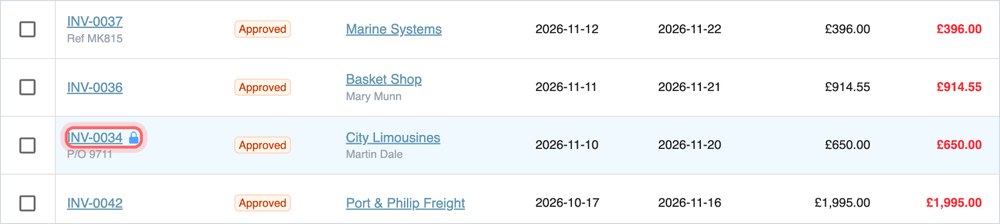
In the invoice list, a padlock sits next to the number of each frozen invoice. The invoice timeline records “Invoice was manually frozen” and “Invoice was unfrozen”. An action that was already scheduled fails with “Invoice is frozen”, so nothing slips out.
A dispute is the common reason to freeze one invoice. Our guide to a disputed invoice covers what to do while it is on hold.
How do you pause one customer?
Open the contact and click Freeze contact in the header. Paidnice then applies no policy to any of that customer’s invoices and sends them no statements.
The header reads Contact frozen. Each of the customer’s invoices shows a Contact Frozen badge. The invoices are not frozen one by one, so when you unfreeze the contact, chasing resumes on every invoice that is not frozen itself.
To freeze several customers, tick them on the Contacts page and use the Freeze Contacts menu. The Frozen column shows a blue padlock for each one.
A freeze has no field for a reason, and a contact freeze shows in no timeline. Write the reason in a note on the contact so the next person knows why. A customer in administration is a typical case for a contact freeze.
What does a freeze stop, and what keeps going?
A frozen invoice is skipped by every policy but still shows on statements. A frozen contact gets no policies, no statements and no quote emails.
| What Paidnice does | Frozen invoice | Frozen contact |
|---|---|---|
| Reminder emails and SMS alerts | Skipped | Skipped for every invoice |
| Late fees and prompt payment discounts | Skipped | Skipped for every invoice |
| Escalations | Skipped | Skipped, contact escalations too |
| Payment plan reminders | Skipped | Skipped for every invoice |
| Statements | Still listed, at its full balance | No statement is sent |
| Statement interest | The invoice is left out | No interest is charged |
| Quote emails | Not affected | Not sent |
| Manual reminder from the invoice | Still sends | Blocked |
Two details matter with a frozen invoice. It does not count toward whether a statement is sent, so a customer whose only unpaid invoice is frozen gets no statement. A one-off late fee still applies if you choose it, and the preview warns “Invoice is frozen. You can still apply this late fee.”
Bulk sends are stricter than single sends. Send reminders from the invoice list fails for a frozen invoice with “Invoice is frozen”.
How do you freeze many invoices at once?
Tick the invoices on the Invoices page and click Freeze. Unfreeze sits beside it and works the same way.
The same list on a contact’s page has both buttons. The Escalations page has Freeze invoices and Unfreeze invoices too, and it skips contact escalations.
To see every paused invoice, open Filters, pick the Frozen column and choose Yes. Then click Save view so the list is one click away next time.
💡 Paidnice insight
Nothing unfreezes by itself, and a freeze carries no reason or end date. We suggest you save the Frozen view and open it once a week, so every pause gets a second look.
The other causes are in our post on why an invoice was not chased.
When does Paidnice freeze an invoice by itself?
In two cases. Autofreeze invoices freezes an invoice that goes from paid back to unpaid, and Paidnice freezes an invoice when a late fee or discount fails partway.
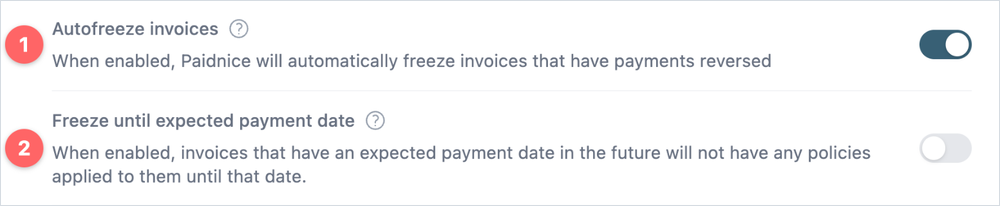
Autofreeze invoices is under Organisation Settings, Advanced, Default Behaviour, and it is on by default. It covers a reversed payment. Without it, an invoice that was paid last week could get a reminder or a late fee the day the payment is reversed.
The second case is a safety stop. If applying a late fee or a prompt payment discount fails partway, Paidnice freezes the invoice so a person can look at it. In both cases, unfreeze the invoice once you know what happened.
How do you make the pause end by itself?
A freeze cannot do that. Nothing unfreezes on its own and a freeze has no end date, so use an expected payment date or a payment promise when chasing must restart.
Freeze until expected payment date is under Organisation Settings, Advanced, Default Behaviour, and it is off by default. With it on, an invoice with a future expected payment date has no policies applied that would run before that date. Chasing restarts by itself after the date. The freeze switch stays off, and manual sends still go.
Set the date in the invoice details panel: click Expected payment, pick a date and click Save.
The other way is to record a payment promise, which holds reminders until the promised date and tracks whether the money arrived. To pause every customer at once, see how to pause reminders for a holiday.
Frequently asked questions
Can the customer see that an invoice is frozen?
No. The frozen status is never written to Xero or QuickBooks, and customers do not see it. A freeze only changes what Paidnice does with the invoice.
Does a frozen invoice still show on the customer’s statement?
Yes. A frozen invoice is listed on statements at its full balance. It is left out of statement interest, and it does not count toward whether a statement is sent.
Can I still send a reminder for a frozen invoice?
Yes, one at a time. A manual reminder, SMS or late fee from the frozen invoice still works. A bulk send from the invoice list fails with “Invoice is frozen”, and a frozen contact blocks manual reminders too.
Does freezing a contact freeze each of their invoices?
No. The invoices show a Contact Frozen badge but are not frozen individually. When you unfreeze the contact, chasing resumes unless an invoice has its own freeze.
Does a Paidnice freeze stop Xero’s own reminders?
No. Xero’s reminders run inside Xero and Paidnice does not control them. Turn them off in Xero for that contact or invoice, or for the whole Xero organisation if you chase from Paidnice.
Paidnice features in this article
About the editorial team
Ashley is a co-founder and lead developer of Paidnice and has built accounting software for more than 10 years. He builds the ledger connections that put reminders, late fees and payments into Xero, QuickBooks and ERPs such as NetSuite and Business Central. Before Paidnice he co-founded A2X, ecommerce accounting software for Xero and QuickBooks.
 App of the Year